Using Apache JAMES Mail Server
Recently, I needed an open source email server for testing purposes and I came across JAMES project. The Java Apache Mail Enterprise Server or JAMES is an open source mail application platform that among many other things is a full-fledged e-mail server. It is a pure Java implementation (built on Spring Framework) and supports all the standard e-mail protocols such as SMTP, POP3 etc. In this post, I will quickly demonstrate how you can set up JAMES on your local Windows box and use it to send emails.
Step 1: Download the latest version of JAMES from Apache site. At the time of this writing the latest stable version is 2.3.2 (james-binary-2.3.2.zip). Unzip the downloaded file to a folder on your box. I will be referring to this directory as JAMES_INSTALL_DIR throughout post.
Step 2: To start JAMES, simply run the “run.bat” file under the
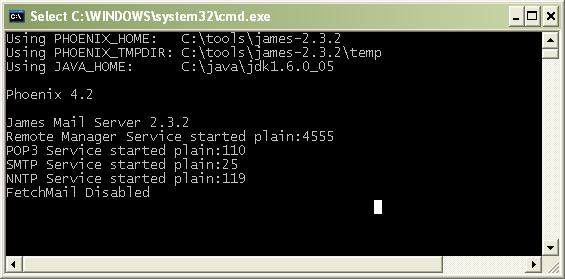
Step 3: Before we can start sending and receiving mails, we need to create a user account on our mail server. JAMES provides a Remote Manager Service on port 4555 that you can telnet into and interact with. Simply launch a new Command Prompt and run the command:
telnet localhost 4555
You should see the Remote Administration Tool and a prompt for your login id.
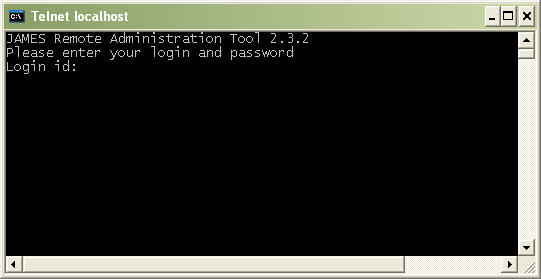
Enter root as your login id and upon prompt for password enter root. This would log you in. To create a new user run the following command: adduser someusername somepassword
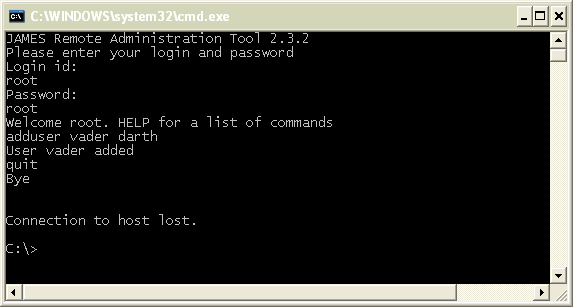
Here are some of the useful commands supported by JAMES:
| Command | Description |
|---|---|
| help | Display help with commands |
| listusers | |
| setpassword | Sets a user’s password. The format is setpassword username password |
| deluser | Deletes an existing user. The format is deluser username |
| adduser | Adds a new user. The format is adduser username password |
| countusers | Shows the number of existing accounts |
| listusers | Lists all the existing accounts in the mail server |
| quit | Closes the connection |
Step 4: Now we have everything installed and setup to send emails. Lets give it a try by running the sample code below:
package com.practicalspring.mail;

import java.util.Properties;

import javax.mail.Message;
import javax.mail.MessagingException;
import javax.mail.Session;
import javax.mail.Transport;
import javax.mail.internet.InternetAddress;
import javax.mail.internet.MimeMessage;

public class Main {

	public static void main(String[] args)
	{
		/***** CHANGE THESE FOUR VARIABLE VALUES TO REFLECT YOUR ENVIRONMENT ******/
		String user = "vader";	// Newly created user on JAMES
		String password = "darth"; // user password

		String fromAddress = "vader@localhost"; // newlycreateduser@localhost
		String toAddress = "SOMEUSER@gmail.com";


		// Create a mail session
		Properties properties = new Properties();
		properties.put("mail.smtp.host", "localhost");
		properties.put("mail.smtp.port", "25");
		properties.put("mail.smtp.username", user);
		properties.put("mail.smtp.password", password);
		Session session = Session.getDefaultInstance(properties, null);

		try
		{
			Message message = new MimeMessage(session);
			message.setFrom(new InternetAddress(fromAddress));
			message.setRecipients(Message.RecipientType.TO, InternetAddress.parse(toAddress));

			message.setSubject("Email from our JAMES Server");
			message.setText("Luke, I'm your father!!");
			Transport.send(message);

			System.out.println("Email sent successfully");
		}
		catch (MessagingException e)
		{
			e.printStackTrace();
		}
	}
}
Here is the generated email in my inbox:

If you don’t see an email in your inbox in the next couple minutes make sure to check in the Spam folder.
when i run your program i get following error with
i have made appropriate changes like username,etc
Exception in thread “main” com.sun.mail.smtp.SMTPSendFailedException: 550 The address is not valid.
;
nested exception is:
com.sun.mail.smtp.SMTPSenderFailedException: 550 The address is not valid.
This works perfectly as long as I send and receive from localhost. Sending to gmail doesn’t work, but that’s probably an IT security thing. Thanks for the awesome tutorial!
How can i add a new user to james from a servlet? please help.
hey man i m not getting any mail using this program…!!!please help me out..!!!i had done program of getting email in intranet using james server but when i sent to outside world mail is not reaching..!!!
First of all thank you. I also got the same problem, while sending email to external network. Please give the solution to send email to external network(e.g gmail or yahoo).
how to execute the above code?i am from a ece background i don’t know how to execute it??is it similar to java execution like javac filename.java
Hi i am used the above code,
i am getting the sop statement without any error mesg, but the mail is not appearing in inbox/spam……
please kindly reply me
Thanks a lot .
It really helped me a lot . I was searching for this . U really did awesome job. Carry on …
Hi All,
Am working on James Server,
I have written a custom mailet for mail delivery and added the mailet in config.xml.
when i sent any mail to users, am getting the delivery notification.
am trying to send a a mail which a non exist user,
this suppose to get a bounce back mail.
am not getting that mail.
please help in this.
Thanks InAdvance.
Pavan
@jason
Hi,
This very good doc for beginners. I can send the mails to internal network. But when I sending to external network like gmail,yahoo,etc… I am not getting the mails. Please help on this.
Hi Jason,
It’s Really very neat-and-clean example related to James Apache , But If you can also provide the configuration required for sending mail to external mail account like (gmail,yahoo,..) in james configuration file ,that will really appreciable ………….Thanks